

Building Privacy-First AI on Android with Local LLM Inference
Most Android AI projects start the same way. A developer connects an app to a cloud-hosted LLM, gets a demo working in a few days, and everyone is impressed. Chat assistants answer questions. Documents are summarized. Search becomes conversational.
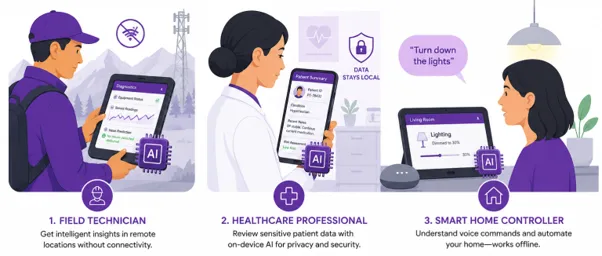
Then production requirements arrive. The AI feature now needs to work inside a hospital with strict privacy rules, or on a field technician tablet with unreliable connectivity, or in a smart-home application where users expect instant responses even when the internet goes down.
At that point, the question isn’t which model to use. It’s where the model should run.
Modern Android devices are becoming more powerful to run multiple AI models directly on the device. With the right optimizations, many language models can now run directly on-device, reducing latency and power consumption, improving privacy, and removing dependence on cloud inference for every interaction.
However, running AI directly on Android brings its own engineering challenges. Before looking at how an SDK addresses them, it is important to understand why many teams are moving away from a cloud-only approach.
Cloud LLMs are still useful. They’re great when an app needs a large model, fresh enterprise knowledge, or heavy reasoning that would never fit comfortably on a phone or tablet.
The problem starts when every AI interaction depends on the network.
That works in a demo. It gets harder in the field. A technician may be using the app in a factory basement with no connectivity. A healthcare workflow may involve information that should not leave the device. A smart-home controller may need to respond immediately, even when the broadband connection drops.
In these cases, cloud inference becomes more than an architecture choice. It affects latency, privacy, reliability (in some cases), and cost.
On-device inference gives Android apps another option. Smaller, focused tasks can run directly on the device, while the cloud can still handle tasks that need larger models or updated information.
In most real products, the best approach will be a mix of both. However, adding local AI is not as simple as placing a model inside an Android app. Teams must manage model formats, device differences, memory, hardware support, runtime setup, and response handling.
These are the problems MosChip’s Android OnDeviceLLM SDK is designed to address.
Getting a model to run once on an Android device is only the first step. Turning it into a reliable product feature requires much more work.
A development team must choose an inference runtime, prepare the model in the correct format, check whether the device has enough memory, and decide whether the model should run on the CPU, GPU, or NPU. The team must also handle model loading, tokenizer files, prompt templates, context limits, response streaming, errors, and testing across different Android devices.
This work becomes more difficult when teams use more than one inference runtime. ExecuTorch, MediaPipe GenAI, and llama.cpp have different model formats, setup steps, and hardware requirements. Without an SDK, developers may need to build and maintain separate integration code for each runtime.
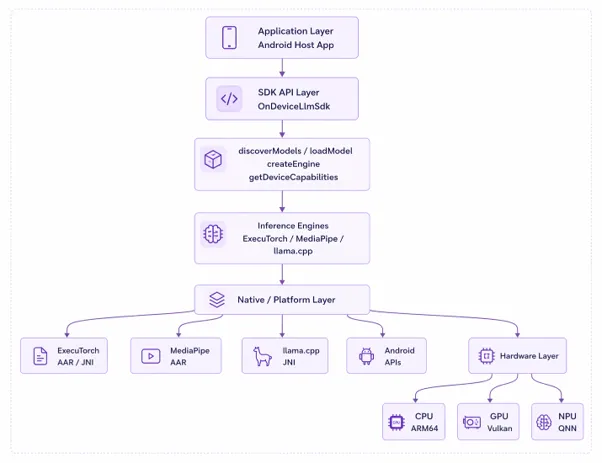
MosChip’s Android OnDeviceLLM SDK reduces this work by providing one common layer between the Android application and the different inference runtimes.
It is a Kotlin-based SDK for running local LLMs on Android. It supports ExecuTorch, MediaPipe GenAI, and llama.cpp through a single API. It also works with common model formats such as .pte, .task, and .gguf.
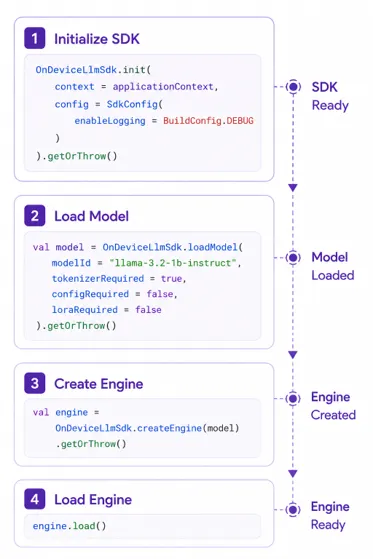
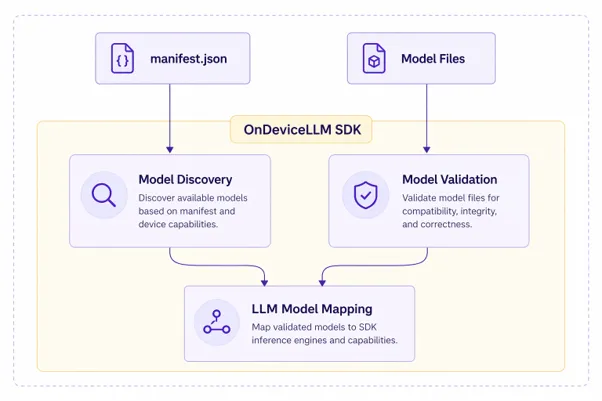
The SDK handles the surrounding work needed to turn a model into a product feature. This includes model discovery, model validation, engine creation, response streaming, context handling, memory checks, device capability checks, and backend selection.
This allows application teams to spend more time building the user experience instead of repeatedly solving runtime and device-level problems.
The following sections explain how this OnDevice LLM SDK handles these challenges.
ExecuTorch, MediaPipe GenAI, and llama.cpp each solve different problems and target different hardware capabilities. The downside is that each runtime introduces its own model formats, initialization logic, deployment process, and optimization path.
For engineering teams, that fragmentation creates maintenance overhead. Switching runtimes can require application changes, testing cycles, and new integration work.
MosChip’s Android OnDeviceLLM SDK introduces a consistent abstraction layer above those runtimes. Applications interact with a single Kotlin API while the SDK manages runtime-specific details underneath.
That separation becomes valuable over time. Teams can evaluate new backends, update model formats, or optimize hardware utilization without repeatedly redesigning application logic. The result is a cleaner architecture that keeps product development focused on user experience rather than inference plumbing.
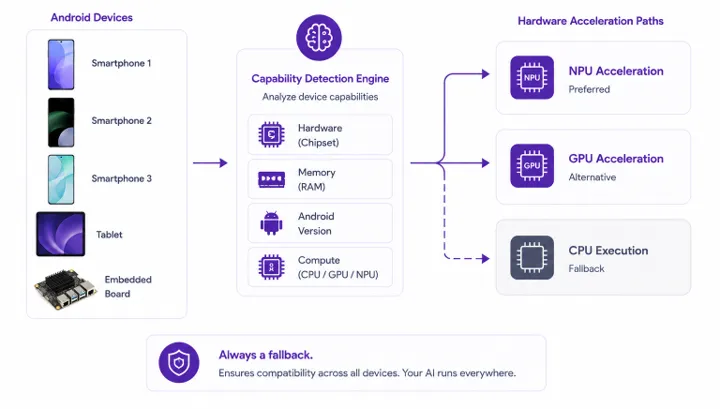
Android hardware is not uniform. One device may rely mainly on CPU execution, another may support GPU acceleration. A Snapdragon-based product may be able to use a Qualcomm QNN-oriented path for NPU execution.
Handling those differences manually across devices can become painful. The SDK helps by detecting device capabilities such as chipset information, available memory, CPU, GPU, and NPU availability.
It also makes testing clearer. Instead of hardcoding assumptions into the app, teams can package model requirements and let the runtime layer decide what is safe to run.
Models are discovered from the app’s internal storage using a manifest.json file. That manifest can describe the model ID, display name, runtime format, primary model file, tokenizer requirements, prompt templates, stop tokens, supported capabilities, backend preferences, compute units, quantization, context length, memory requirements, and metadata such as author or license.
Keeping model details separate from the application’s main feature code makes the app easier to maintain. A team can change the model file, tokenizer, runtime, prompt template, or hardware preference without rewriting the user flow.
For example, a team may replace a .gguf model with a .pte model or update the required memory limit. When these details are stored in the manifest, the change can be made in one place instead of being added throughout the application code.
This also reduces mistakes. The SDK can read the model requirements, check whether the device is compatible, and stop an unsupported model from loading. As the product grows, teams can update or replace models without redesigning the rest of the app.
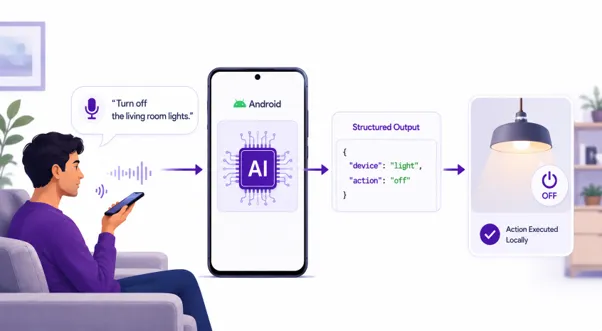
Take a simple smart-home command:
“Turn off the living room lights.”
With a cloud-first setup, the app may need to send that request to a remote model, wait for the response, parse the intent, and then trigger the device action. That is fine when the network is stable. It feels much worse when the user is standing in a room, and the lights do nothing because the internet is down.
With local inference, the app can interpret the command on the device and convert it into structured output.
The application can then map that output to a Matter command or another device-control action. The user request stays on the device, the response does not depend on internet connectivity, and the language model becomes a bridge between human intent and machine-readable instructions.
One lesson became obvious early in development: Android hardware behaves far less consistently than cloud infrastructure.
Two devices with similar memory and processor specifications can produce noticeably different inference performance. Thermal throttling, vendor-specific optimizations, available accelerators, background services, and memory pressure all affect how a model behaves in real-world conditions.
I also found that model execution speed is only part of the problem. Loading large models, managing context windows, handling tokenizer requirements, and preventing memory fragmentation often require more engineering effort than running inference itself.
Another important lesson was that developers should not have to manage every device and runtime difference inside the application. Those details should be handled by a common SDK layer wherever possible.
These lessons shaped the way I built MosChip’s Android OnDeviceLLM SDK. We designed it to handle runtime selection, device checks, model validation, and resource management so application teams can focus on the features they are building.
The useful question is no longer, “Should AI run in the cloud or on the device?”
For most Android products, the answer will be both.
Cloud models still make sense for complex tasks, large knowledge bases, and workflows that need the latest updated information. On-device models make sense when the task is local, latency-sensitive, privacy-sensitive, or needs to work offline.
This changes how Android teams plan AI features. They must decide which tasks should stay on the device and which should use the cloud. That decision affects privacy, cost, reliability, and overall user experience.
MosChip’s Android OnDeviceLLM SDK supports this approach by giving teams one way to run local models across different Android devices and inference runtimes. As Android hardware continues to improve, running AI on the device will become a practical choice for more products.
The goal is not to move every AI task onto the device. Teams can start with tasks where privacy, response time, or offline access matter most. With the right device checks and runtime support, local AI can become a reliable part of the product rather than just a working demo. That is the problem we built MosChip’s Android OnDeviceLLM SDK to solve.
The SDK is just one piece of the larger picture when it comes to the Android engineering ecosystem. MosChip has extensive experience of working in enabling Android across various consumer and automotive products.
The services include everything from Android Platform Engineering, Device Enablement and Multimedia, Android Application Engineering, Connectivity and Intelligent Experiences, and Validation to making systems certification-ready.
To learn more about our Android capabilities, write to us and our team will be happy to help you with your Android requirements.
The SDK reduces the work needed to run local language models on Android. It provides one API for ExecuTorch, MediaPipe GenAI, and llama.cpp. It also helps with model discovery, validation, device checks, runtime selection, memory handling, and response streaming. This allows developers to focus more on the app feature and less on device-level setup.
Yes. The SDK can run many popular open-source language models if they are available in a supported format such as .pte, .task, or .gguf. Actual performance depends on the model size, available memory, and the CPU, GPU, or NPU support of the Android device.
Yes. You can run smaller LLMs directly on Android devices using supported runtimes and model formats. Performance depends on the model size and the device’s memory and hardware.
Yes. You can add AI features such as chat, summarization, search, or voice commands to an Android app. The AI can run on the device, in the cloud, or use both approaches.

Meet Prajapati is a Lead Mobile Engineer at MosChip with over 7 years of experience in mobile application development across Android, Flutter, and React Native. He specializes in on-device AI, edge computing, and real-time systems, building intelligent and high-performance applications. He is passionate about creating scalable solutions that bring intelligent functionality closer to end users.

Modern industries are moving toward smarter, more connected, and highly automated operations…
As the automotive industry is emerging with Software-Defined Vehicles (SDVs) and autonomous vehicles, Advanced Driver Assistance Systems (ADAS) are encountering serious challenges day by day…
Factory floors today are generating more operational data than ever before. From CNC machines…

Engineering teams building connected products spend a significant amount of time solving the same foundational problems…

I have always thought that a surveillance system is only as good as its ability to quickly turn vision into timely insights…
Today, almost every OEM is racing to bring intelligent, AI-enabled products to the market across automotive, industrial…
FPGA products are no longer just about getting the RTL right. Building a production-ready FPGA platform...
Android has evolved beyond an operating system into a foundation for building connected, intelligent...
Today’s consumer products respond after something has happened. Your wearable tells you your heart rate is elevated.…
AI inference workloads are becoming more compute-intensive, with higher demands...